
Elevate B2B
A dark product site: one near-black surface, one grey hairline for every edge, white as the only accent and a single green for what is live. DM Sans carries every size, so the display sizes are told apart by weight and tracking alone.
- Variables
--el-*- Defined in
app/demo/elevate-b2b/elevate.css- Values
- Read live from that file, so this page always matches it.
Colour
The whole palette, grouped by the job each colour does. Components only paint with these.
Surfaces
--el-bg--el-bg-2--el-bg-3Ink
--el-fg--el-ink--el-placeholderAccent
--el-fill--el-on-fillLines and fields
--el-line--el-line-bar--el-line-input-hover--el-line-hover--el-focus-ringSignal
--el-green--el-green-bg--el-dot--el-dot-ringTypography
The ramp, largest first. Each class sets its own face, size, leading, weight and tracking, and the display sizes step down at the breakpoints.
.el-6xlUnlock the Full Experience
.el-5xlChoose your perfect plan
.el-4xlPage Not Found
.el-3xlDepartment of Justice Tablet
.el-2xlAnalytics in real time
.el-xlPay once, unlock everything
.el-largeTake your FiveM roleplay experience to the next level.
.el-baseAccess reports, records, and key data whenever you need them.
.el-smallEssential tools for small departments.
Corners
Every radius in the template. Nothing rounds on a value of its own.
--el-radius--el-radius-pillSpacing
The page rhythm. These step down at the breakpoints, so the readings follow the window. Each bar is drawn at its real length.
--el-section--el-gap--el-gutter--el-containerMotion
How long things take and how they ease. Hover a row to run it: durations on the house ease, easings on one duration long enough to show the curve.
Durations
--el-dur-fast--el-dur-hover--el-dur--el-dur-slowEasings
--el-ease--el-ease-expo--el-ease-quart--el-ease-circBreakpoints
Where the layout changes. A media query cannot read a variable, so these are the one set of numbers written straight into the stylesheet and the components.
max-width: 991pxmax-width: 767pxmax-width: 479pxComponents
The template's building blocks, live. Hover them: this is how they behave on the pages.
It’s finally here.
- Access to core CAD functionalities
- Limited to 2 users per department
- 5 pre-configured call types
- Basic incident reporting tools
Organize, supervise, and optimize your team's tasks efficiently from an intuitive interface.
Access reports, records, and key data whenever you need them, without missing a detail.
Experience the most realistic police experience with tools designed to fully immerse you in the role.
Choose your
perfect plan
Pay once, get access forever.
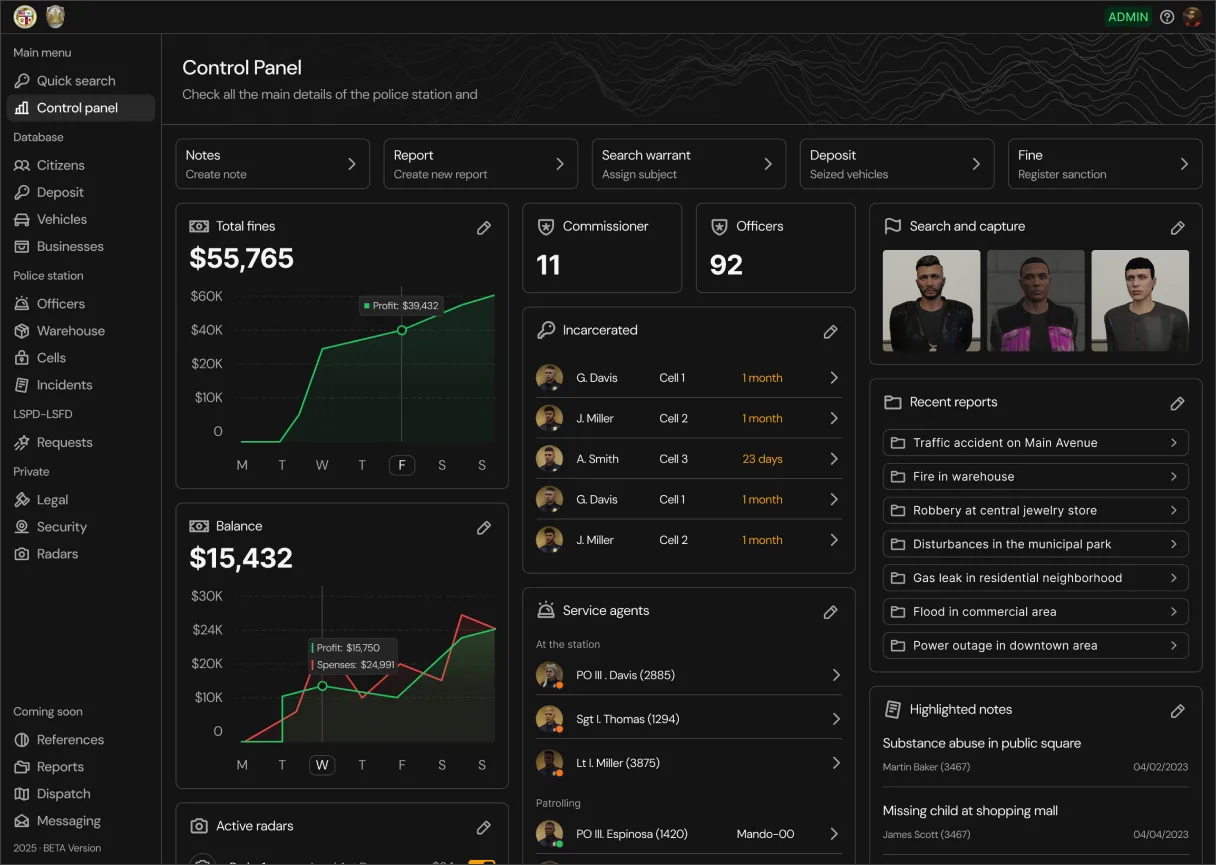
We haven't announced the exact release date yet, but our goal is to launch it in early 2025. We want to make sure everything is thoroughly tested and working perfectly before the launch.
In V1, we have focused on including the most essential features. However, for V2, we plan to introduce features such as:
- Messaging or email system: to facilitate internal communication.
- Dispatch: a tool to manage notification systems and assign units efficiently.
- Management of references, names, and colors: for more detailed and personalized control.
And this is just the beginning. We will continue to reveal more features as the launch approaches.
Currently, the tablet development is based on the QB Core framework, but we plan to expand it to be compatible with ESX in the future.
The price will be announced as the launch date gets closer. Additionally, we will offer a special pre-sale discount, available for a limited time.
Absolutely! The tablet will be updated periodically. In version 1, we’ve included the features we consider most essential, but we’ll continue adding new ones with each update.
If you have a feature in mind or can't find what you're looking for, feel free to send us a message. We’ll be happy to work on it and make it even more complete.